F2PE Options Software Guide
Firmware Update, Mode Switching, Global Parameters
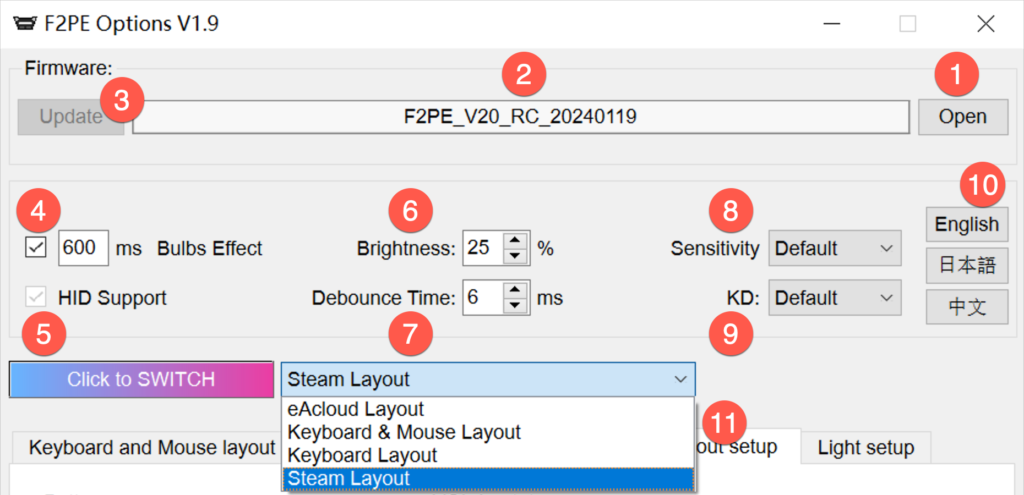
| # | Description |
|---|---|
| ① | Open the firmware folder |
| ② | Display the current firmware version number |
| ③ | "Upgrade" button |
| ④ | The button light turns off slowly. 600ms is the default value, meaning it takes 600ms to go from maximum brightness to 0. |
| ⑤ | Support for Output HID. If using Spixxtxxls software, it is recommended to check this box. |
| ⑥ | This is the global light brightness and affects all light brightness on the F2PE. |
| ⑦ | Key debounce time. When multiple key triggers occur, increase the value. Recommended range: 6–15ms. Does not cause trigger delay. |
| ⑧ | This function only affects the sensitivity of song selection. It will not affect knob performance in-game. Recommended: use default. Too fast → try 2; too slow → try 3. Not recommended to use 1. This setting has little effect on KSM and USC. |
| ⑨ | KD = Knobs Debounce. Recommended: use default. When turning the knob at high-speed right angles, turn it slightly earlier. If knob output is erratic, try 4 or 5. |
| ⑩ | Language switching. To use other languages, modify languagepack.xml yourself. |
| ⑪ | Select any mode from the drop-down menu and click the Switch button to apply. Default is eAcloud Layout. |
Keyboard & Mouse Layout
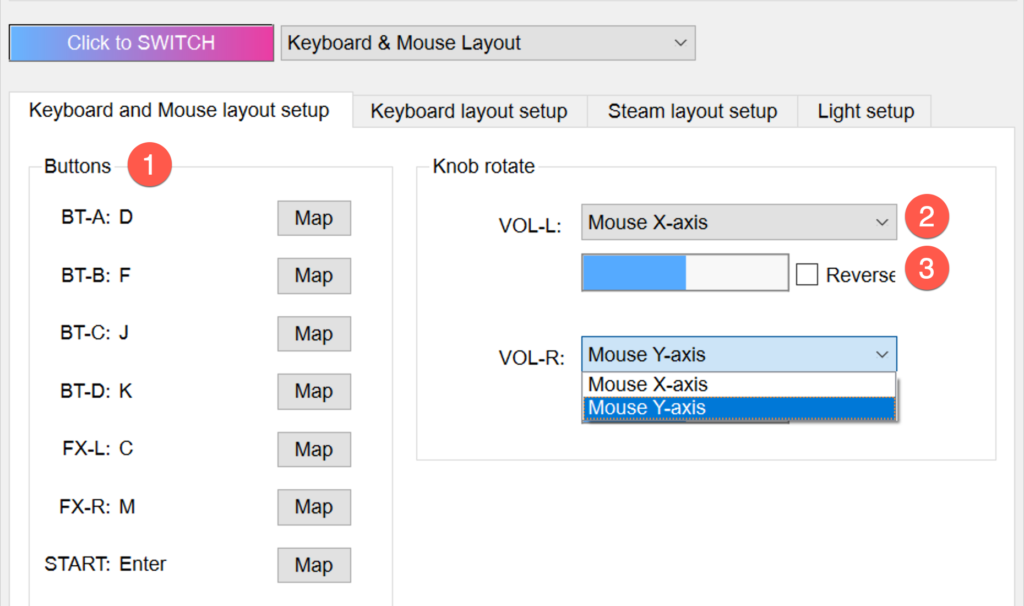
| # | Description |
|---|---|
| ① | Click the "Mapping" button and press any key on the keyboard to bind the key value |
| ② | Select the mouse X-axis and Y-axis from the drop-down menu |
| ③ | Reverses the current mouse movement direction |
Keyboard Layout
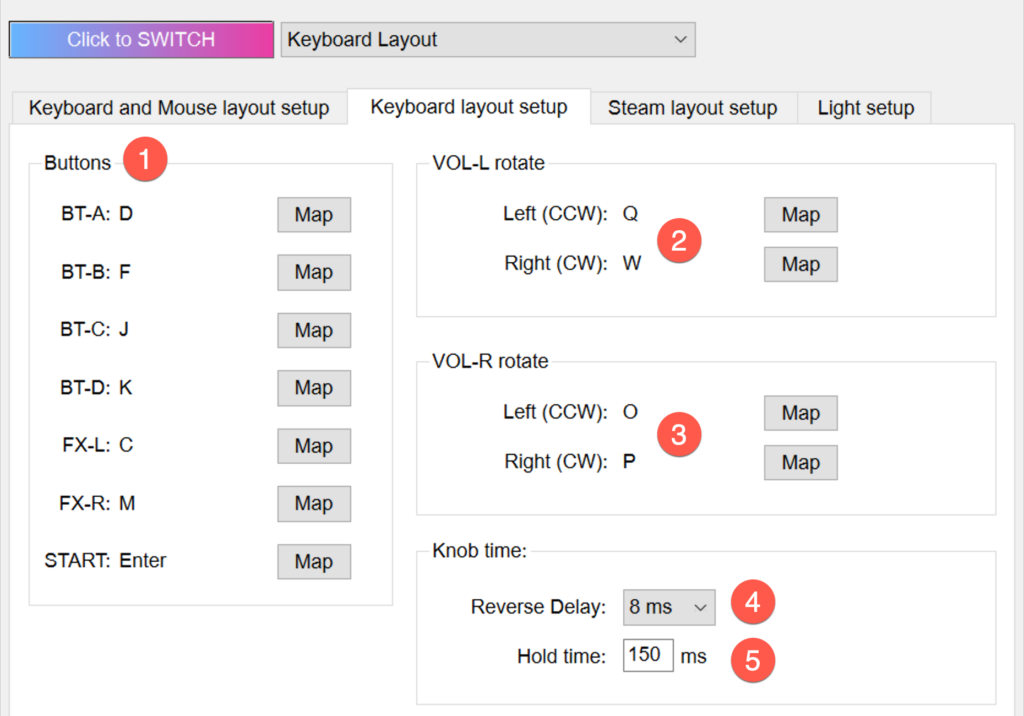
| # | Description |
|---|---|
| ① | Click the "Mapping" button and press any key on the keyboard to bind the key value |
| ② | Click the Map button to set the clockwise and counterclockwise key values for VOL-L. Can be set to the same key value. |
| ③ | Click the Map button to set the clockwise and counterclockwise key values for VOL-R. Can be set to the same key value. |
| ④ | Extended time when switching between clockwise and counterclockwise key values. Useful in DJMAX RESPECT and EZ2ON. Recommended default: 8ms. |
| ⑤ | Time the key value is held when the knob stops. Set as needed. |
Steam Layout
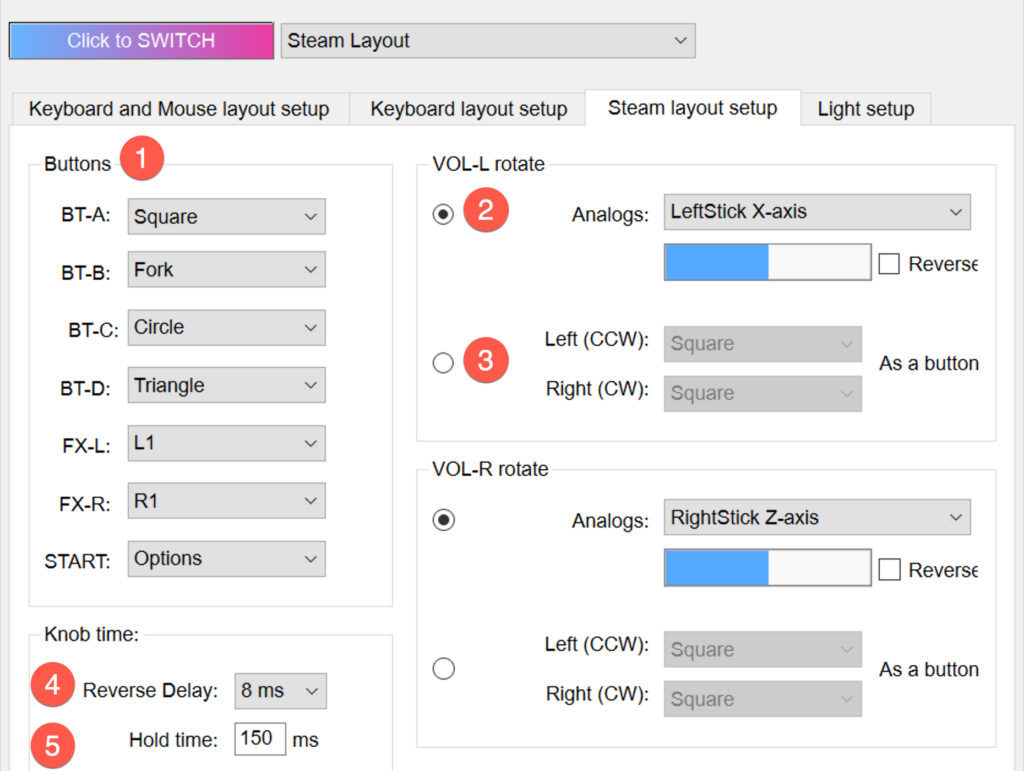
| # | Description |
|---|---|
| ① | Drop-down menu to select any DS4 key value. Supports selecting the same key value. The knob's analog value and button key value have a conflicting relationship and cannot be set the same. Example: If VOL-L is set to LeftStick X-axis, buttons cannot be set to LeftStick left or LeftStick right. |
| ② | Specify the knob as any axis on the gamepad. |
| ③ | The knob outputs a key value clockwise and a key value counterclockwise. Can be set to the same key value. |
| ④ | Delay time when switching rotation direction. Valid for DJMAX RESPECT and EZ2ON. If using 1ms, these games may miss inputs. Recommended: 8ms (no effect on judgment). |
| ⑤ | The time the key value is held when the knob stops. Set as needed. |
Lighting Settings
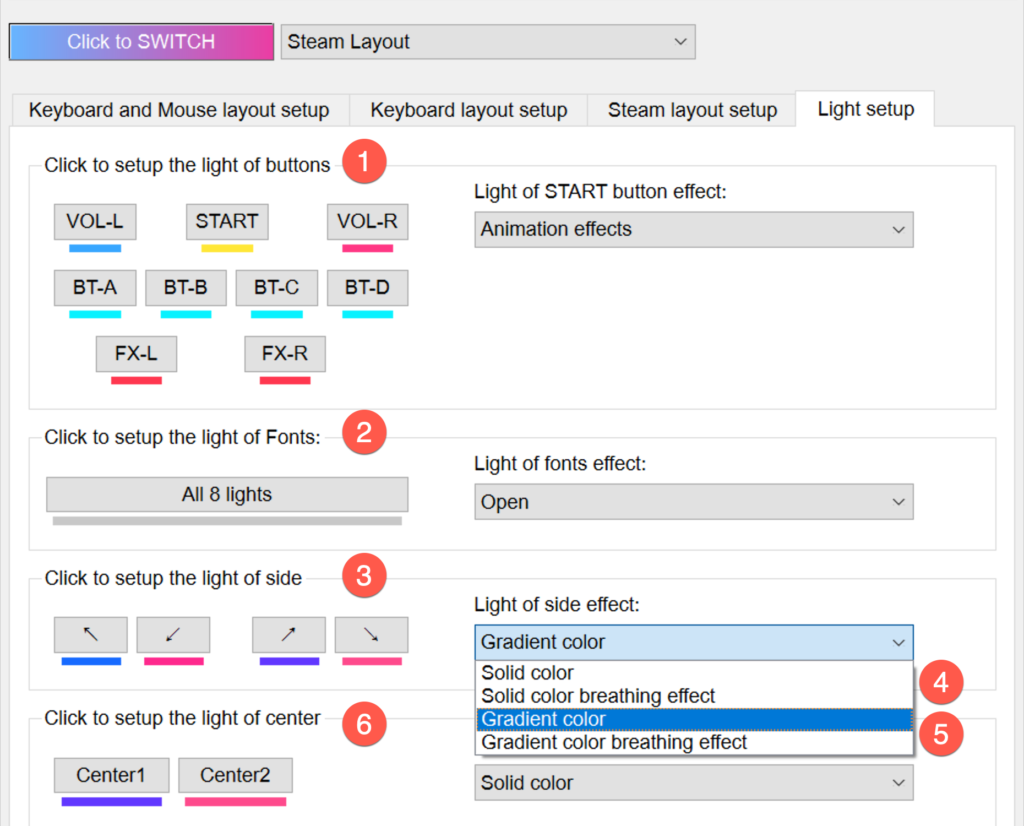
| # | Description |
|---|---|
| ① | Set the light color when 7 buttons and 2 knobs are triggered. The brightness of the RGB color set here is affected by the global light brightness. |
| ② | Light color for BT and FX text labels. |
| ③ | Set the light color for the left and right sides. |
| ④ | Fixed color — only 1 color can be selected. |
| ⑤ | Gradient color — 2 colors can be specified. Transition colors are done automatically by the algorithm. |